Your Tesla already knows its battery level, its cabin temperature and where it’s parked. The Tessie connector lets your agent know it too — and act on it, in plain language.
The car, in real time
Connect Tessie and your agent can read the live state of every Tesla in your account: battery and range, charging status, cabin and outside temperature, location, tyre pressure — even the weather where it’s parked. Ask “is the car charged enough for the airport run?” and it answers from the car, not from a guess.
It reads the past too — previous drives and charging sessions, efficiency since the last charge, and long-term battery health — so “how much did charging cost this month?” becomes a question your agent can actually answer.
And it works the controls
Reading is only half of it. Through Tessie your agent can precondition the cabin before you leave, set the target temperature, warm the seats and the steering wheel, lock or unlock, start or stop charging and set the charge limit, switch on Sentry, and flash the lights to find the car in a busy car park. You ask in words; it sends the command.
“Warm the car to 22° and have it charged to 80% by 7am.” One sentence — and the cabin’s warm and the battery’s ready when you walk out the door.
What the raw Fleet API can’t do
Tessie signs commands with Tesla’s Vehicle-Command protocol, so it can reach things the official Fleet API refuses to do remotely — most notably closing and venting the windows (and the sunroof). Started to rain while the car’s parked across town? Your agent can close the windows from the chat.
Your token, your cars, encrypted
You connect it with your own Tessie API token, which only ever controls the Teslas in your Tessie account. The token is encrypted and the model never sees it — the agent acts through the connector without touching the secret behind it — and, like every connector, it’s project-scoped, so access lives exactly where it belongs.
Live & historical data — battery, range, location, climate, drives, charges, health
Real commands — precondition, lock, charge, seats, Sentry, and dozens more
Windows & sunroof the raw Fleet API won’t close remotely
Encrypted token, project-scoped, never seen by the model
Pair it with a Sensor and it turns proactive — that’s how one user turned a chat into a Model X thermostat that holds the cabin in a 25–30° band by itself.
Most AI agents wait to be asked. Sensors flip that — a tiny script that watches one condition on a loop, inside your agent’s own container, and pings your agent the moment something actually changes.
A lot of useful work in a business is that shape: watch this, and tell me when it changes. New orders. A price. A server. A car cooling down. One of our users recently told their agent to watch their Tesla’s cabin temperature and ping them when it cooled — then, over a single chat, turned it into a full thermostat that switches the AC on and off by itself. We’ll get there. First, let’s build one.
What a sensor actually is
Three parts. A script you (or your agent) write at workspace/sensors/<name>.py that checks one thing and prints a single line of JSON. A loop the platform runs for you — every interval_seconds (minimum 10) — executing that script in the agent’s sandbox, with no model call per tick, so it’s effectively free to run. And a delivery that fires only when the condition trips.
The whole contract your script prints is just {"condition_met": true, "message": "…", "data": {…}}. That’s it.
You don’t need to read any of the code below to use sensors. The steps that follow show what’s happening under the hood — handy if you’re technical or want to hand-tune one. The everyday way to make a sensor is simply to ask: tell your agent something like “watch X and tell me when Y” and it writes the script, picks the trigger, and wires up the delivery for you. The Tesla thermostat further down was built exactly that way — entirely by chat, with no human touching code.
Step 1 — Open the Sensors tab
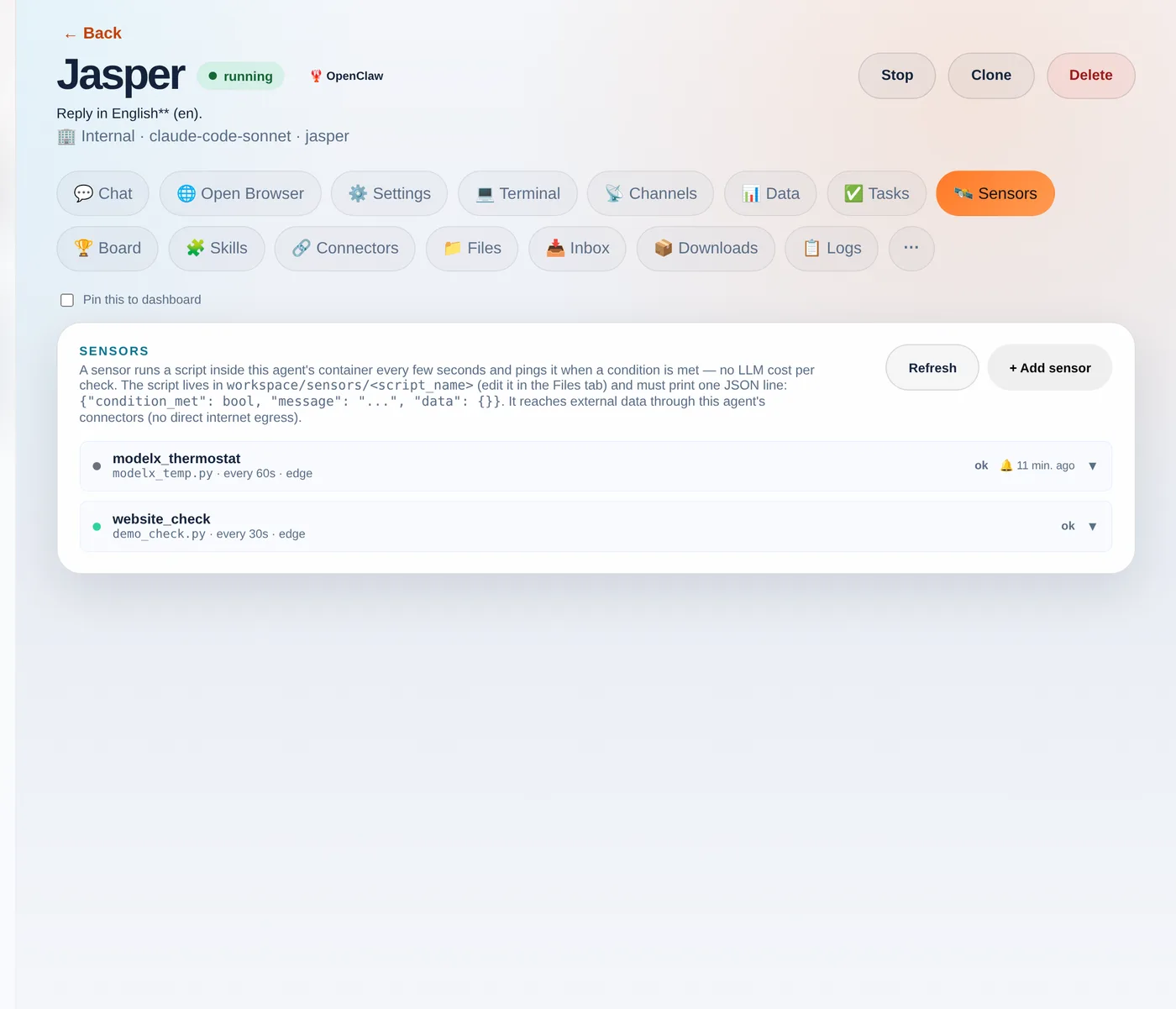
Open any agent and go to the 🛰️ Sensors tab. You’ll see the contract, a + Add sensor button, and any existing sensors with their last status.
The Sensors tab. Each sensor shows its script, interval, trigger mode and last status.
Step 2 — Write the script
In the Files tab, create a file under sensors/ — say demo_check.py — that prints the JSON contract. Here’s a self-contained example you can paste as-is:
import json, os

# Sensors hand the previous run's "data" back as $SENSOR_PREV_DATA, so a sensor
# can compare against last time. This demo just counts runs.
prev  = json.loads(os.environ.get("SENSOR_PREV_DATA", "{}"))
count = prev.get("count", 0) + 1

print(json.dumps({
    "condition_met": count >= 1,            # <-- your real check goes here
    "message": f"Demo check #{count}: all good",
    "data": {"count": count},
}))
The platform hands your script a couple of things for free as environment variables: $SENSOR_PREV_DATA (the previous run’s data, so you can diff against last time) and credentials to call your agent’s connectors.
Step 3 — Add the sensor
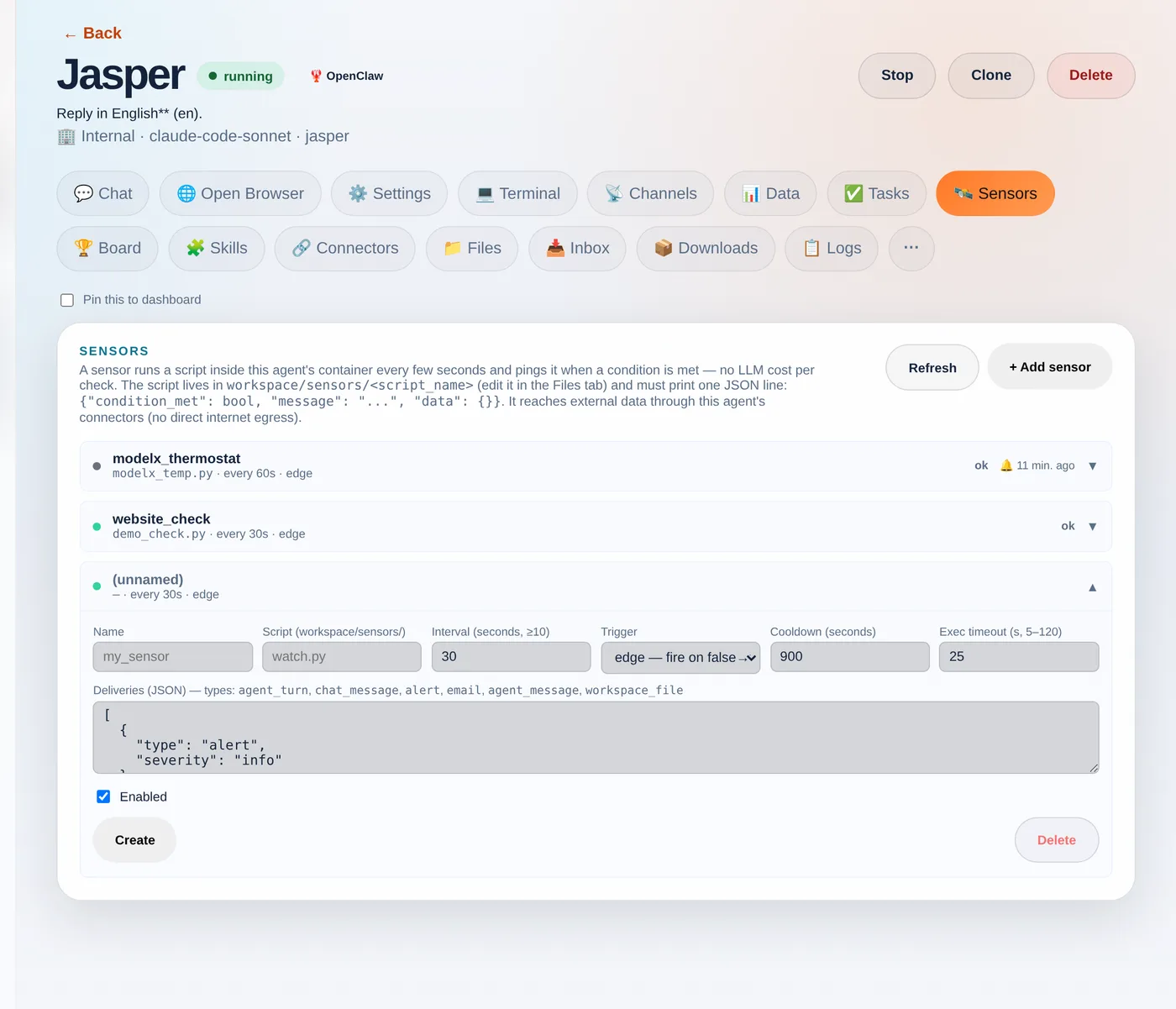
Back on the Sensors tab, click + Add sensor and fill in the form: a name, the script filename, how often to run, and the trigger.
The new-sensor form: point it at your script and choose how it fires.
Trigger — edge fires once when the condition flips false→true (best for “tell me when X happens”); level fires on every true tick; change fires whenever the data changes.
Cooldown — the minimum gap between pings, so a condition that stays true doesn’t spam you.
Deliveries — an alert, an email, a chat_message straight into the chat, a written workspace_file, or an agent_turn that wakes the agent to act.
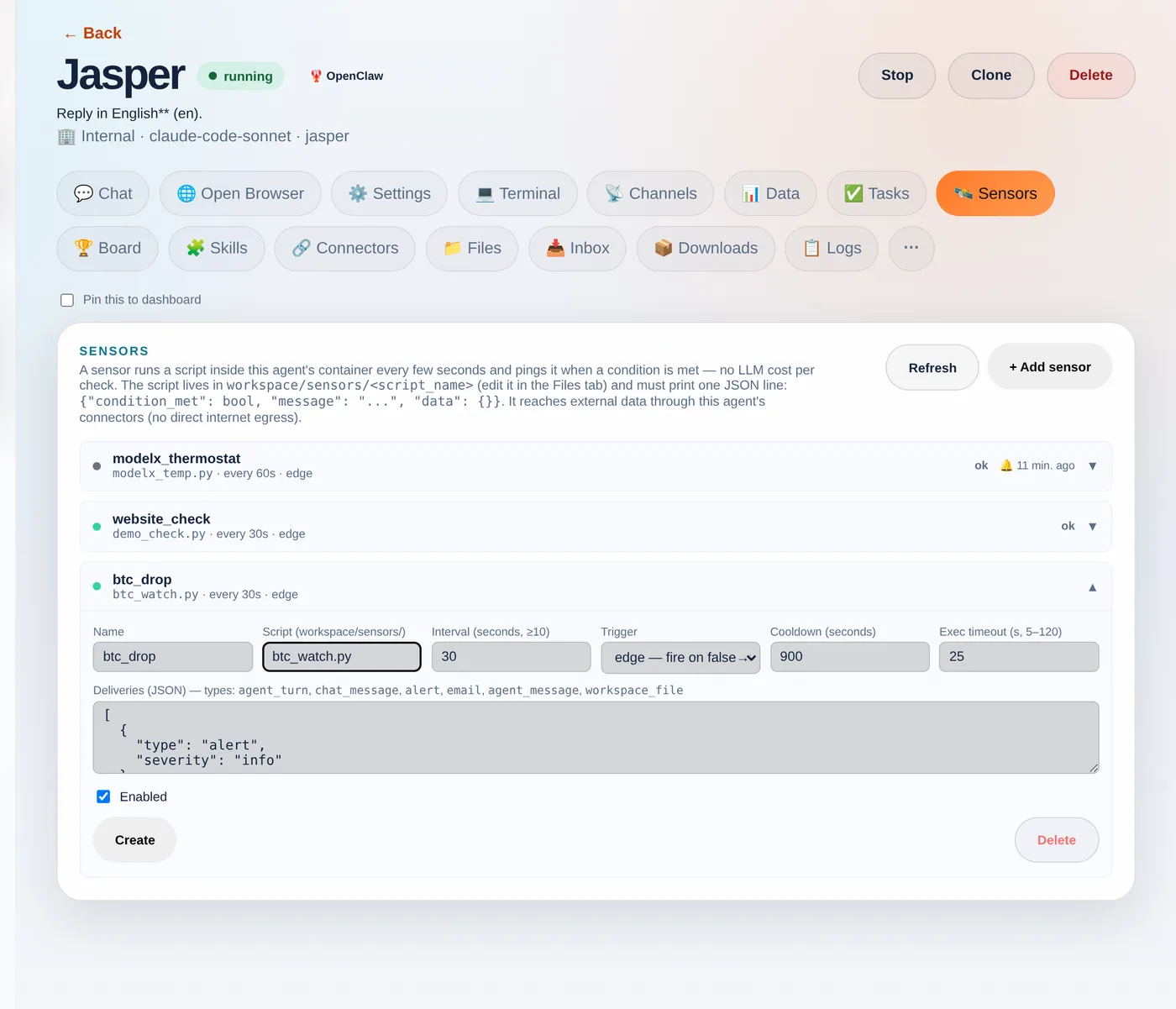
Name it and point it at your script — here a "btc_drop" sensor using btc_watch.py.
Step 4 — Test before you trust
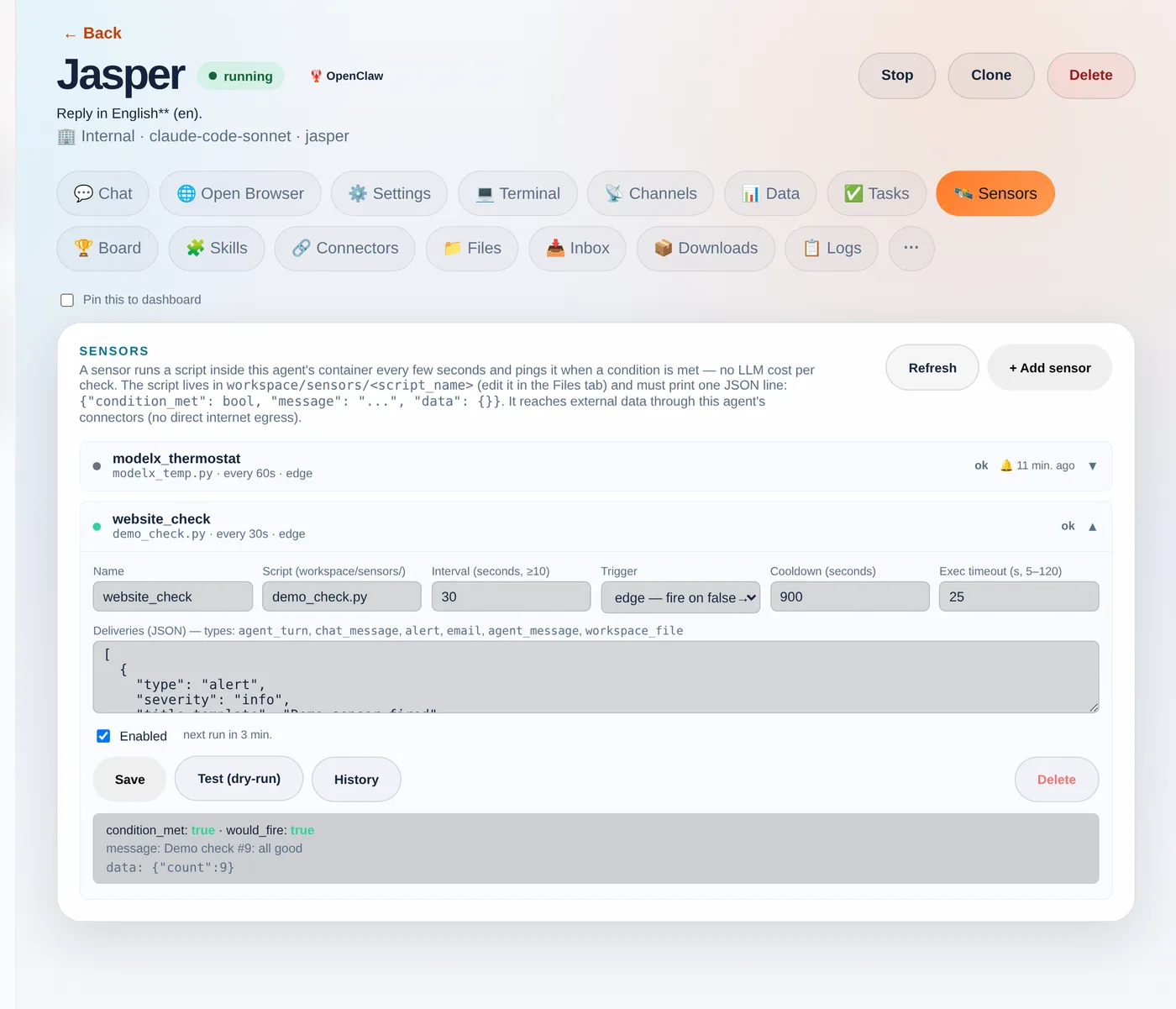
Hit Test (dry-run). It runs your script once, now, and shows exactly what it returned — condition_met, whether it would fire, the message and the data — without changing anything or sending a delivery. The fastest way to iterate until it’s right.
The dry-run shows condition_met, would_fire and the message + data — with no side effects.
Step 5 — Watch it run
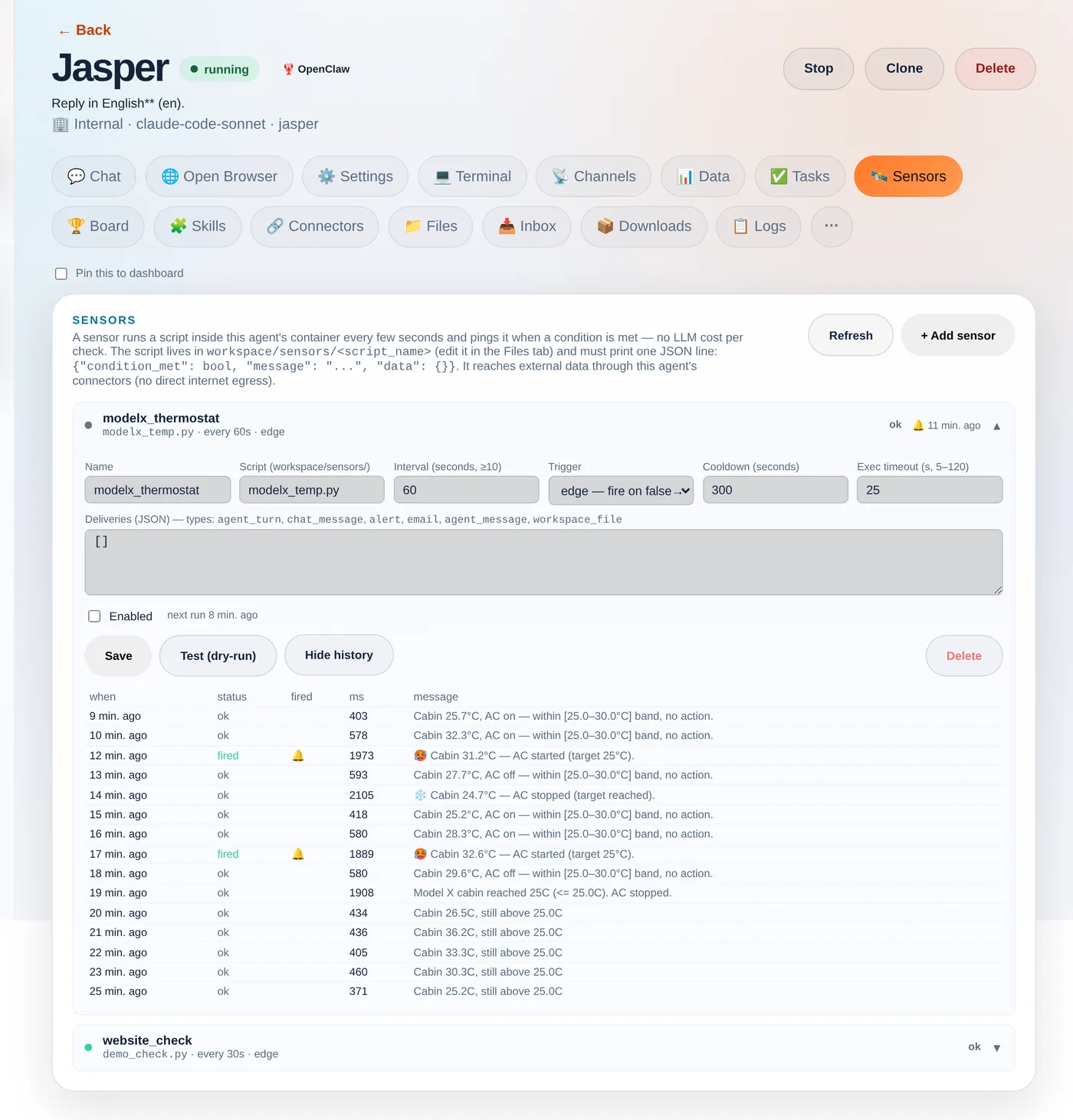
Once saved, the sensor runs on its loop. Click History to see every recent run: its status, whether it fired, how long the script took, and the message it printed. This is where “cheap to watch, only act on an edge” becomes visible.
Real run history from a sensor that watches a Tesla — and acts: it holds the cabin in a 25–30°C band.
The Tesla that built its own thermostat
Which brings us back to the car. The user asked their agent to set the Model X to 25° and tell them when it reached it. The agent wrote a sensor that polls the car through the tessie connector every 60 seconds. The cabin was baking at 51°C; eleven minutes later, on its own:
🛰️ Model X cabin reached 24.1°C (target 25.0°C)
Then they kept going — fire when it goes above 30°, turn the AC off when it hits 25°, and finally “bounce between 30 and 25 indefinitely.” The agent rewrote the sensor each time until it was a genuine thermostat: cabin ≥ 30°C → start the AC; ≤ 25°C → stop it; in between → nothing. The history above is that exact sensor. And notice: the control loop runs as plain code — the model was only involved while authoring it by chat. That’s the whole idea: natural language to write the automation, cheap deterministic code to run it. Your script reaches real data through your agent’s connectors — any REST API, your store, your CRM, or a car:
import json, os, urllib.request

def connector_get(slug, path):
    req = urllib.request.Request(
        f"{os.environ['INTERNAL_BASE_URL']}/api/internal/connectors/{slug}{path}",
        headers={
            "X-Internal-Secret": os.environ["ORCHESTRATOR_SECRET"],  # injected per agent
            "X-Company-Id":      os.environ["COMPANY_ID"],
            "X-Agent-Slug":      os.environ["AGENT_SLUG"],
        })
    return json.load(urllib.request.urlopen(req, timeout=15))

# Read a Tesla's cabin temperature through the Tessie connector
state  = connector_get("tessie", "/<VIN>/state?use_cache=false")
inside = state["climate_state"]["inside_temp"]

print(json.dumps({
    "condition_met": inside <= 25.0,
    "message": f"Cabin {inside}°C (target 25°C)",
    "data": {"inside_temp": inside},
}))
How Agentura sensors are different
Most automation and “AI agent” platforms hand you a fixed menu: a time trigger, a webhook trigger, and a no-code condition builder where you pick a field and an operator. That’s neat — until the thing you want to watch doesn’t fit the menu. The nearest relatives in spirit are Apache Airflow’s sensors (poll until a condition is met) and the newer idea of “ambient agents” (agents woken by events instead of prompts) — but those are still scaffolding a developer wires up by hand.
Here, your agent writes the sensor itself, as real, bespoke code — generated on the spot for exactly what you asked. There’s no fixed list of supported conditions to choose from: describe it in plain language and the agent can chain several API calls, compute a rolling average, join two data sources, diff against the last run, decide, and act. Because it’s genuine code running against your connectors, the ceiling is whatever code and your integrations can do — in practice, the sky’s the limit, not whatever some settings form happened to anticipate. And it stays cheap: the loop is plain code with no model call per tick, so you can watch something every few seconds without spending tokens — the AI only steps in to build or change a sensor, or when a trip is set to wake it to act.
A few rules of thumb
Default to edge + a cooldown — the difference between “tell me when it hits 25°” and a ping every 60 seconds while it sits there.
Checks are free; actions aren’t. Polling and conditions are plain code. Only agent_turn spends a model call — gate it behind the trigger.
Minimum interval is 10 seconds, and Test (dry-run) until the JSON is right before you let it loose.
Sensors give your agents something most assistants lack: a sense of their surroundings, and the initiative to act on it. Point one at whatever you keep checking by hand and let it watch, so you don’t have to.
A real teammate has a name, an inbox, and a way to reach the people they work with. Agentura agents do too. Each one gets its own email address, they hand work to each other directly, and they keep you in the loop on the channels you already use.
A single chatbot lives in one box and waits to be spoken to. A team needs to communicate — outward to customers, sideways to colleagues, and upward to you. So we built three kinds of communication into every agent.
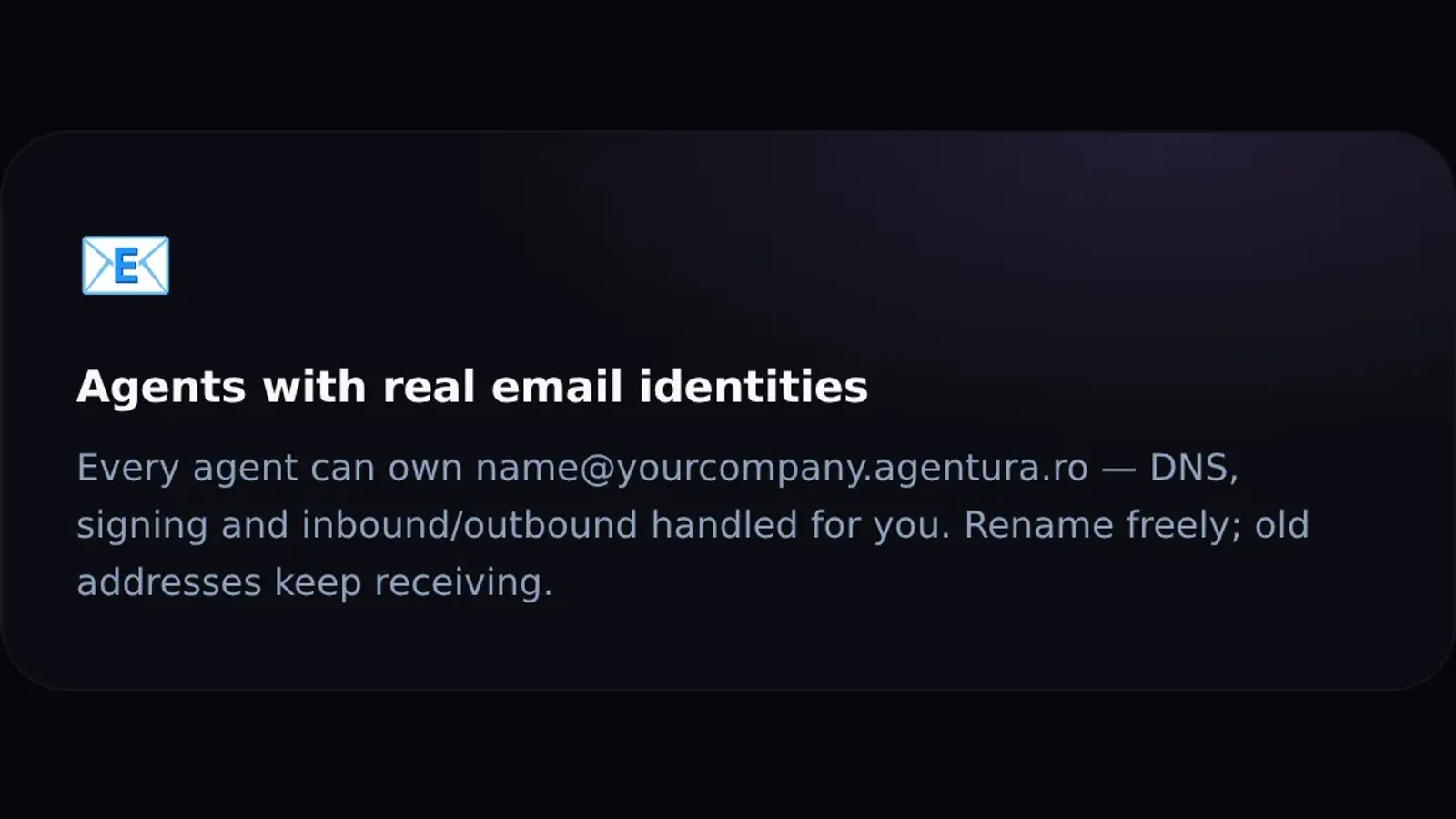
Give an agent an address like [email protected] and it becomes a real, working inbox. The agent reads what arrives and replies from that address — and the unglamorous plumbing is handled for you: DNS records, message signing, and reliable inbound and outbound delivery so messages actually land instead of falling into spam.
Because the address belongs to the role, not to a person, you can rename an agent freely and its old address keeps receiving — no broken threads, no lost mail. Customers email a department; whichever agent staffs it answers.
They talk to each other
Agents delegate and consult one another — no human relay in the middle.
The interesting part is what happens between agents. A manager agent can delegate a task to a specialist and wait for the result. When a question lands outside one agent’s scope, it can consult a colleague instead of guessing or giving up. Work moves down the hall, agent to agent, without a human in the middle copy-pasting between two chat windows.
This is genuine messaging between agents, not a scripted hand-off — and it’s governed by the same need-to-know rules as everything else. An agent can ask a teammate for help without being handed that teammate’s data or keys.
Customers get a reply. Colleagues get a hand. You get a heads-up — only when it matters.
They talk to you
The third direction is the one you feel most: agents talk to you. They reach you on WhatsApp, Telegram, email, or right in the dashboard — and, crucially, they escalate only when they genuinely should. A capable agent handles the routine itself and pulls you in for the judgment calls, so you hear about the exceptions, not the noise.
Put the three together — an inbox of their own, a line to each other, and a line to you — and your agents stop behaving like isolated bots and start behaving like a team that communicates. Which is the whole point.
The hardest part of adopting AI isn’t the AI. It’s the blank page. What agents do I even need? How should they be organized? What should each one know? So we made onboarding itself an agent — a CEO-style interviewer that designs your team for you.
Most tools hand you an empty builder and wish you luck. You’re expected to already know the answer to a question you’ve never had to ask: how do you turn “I run a business” into “here is my AI org”? The empty builder is still there if you want it — but you don’t have to start from a blank canvas. Agentura answers the question with a conversation.
Onboarding is an agent
Instead of wiring up a wizard yourself, you can talk to Elon, a CEO-style onboarding agent. It interviews you about your business the way a sharp new operations lead would: what do you sell, who do you serve, where do customers reach you, what slows your team down.
A CEO-style agent interviews you and proposes your whole team — projects, roles, and the first set of agents — then builds them on your say-so.
It doesn’t only listen. Elon scouts the public web to understand your company in context, then proposes a minimum viable organization: the projects you need, the teams inside them, and the specific agents to staff them — each with a clear role, and scheduled workflows where they help. Approve it, and the platform provisions the whole structure for you in the background.
From a single conversation to a working team — designed in one sitting, then built for you.
From idea to working team in one sitting
This collapses what’s normally days of “designing your AI strategy” into a single conversation. Instead of staring at an empty dashboard, you finish onboarding already looking at a sensible structure: a sales agent on your busiest channel, a support agent on email, an internal helper for your team — organized into projects that mirror how you actually operate, with the agents themselves spinning up in the background.
And nothing is locked in. The org Elon proposes is a starting point you fully own: rename agents, change what each one can see, add specialists, retire ones you don’t need. The point isn’t to decide everything for you — it’s to make sure you never start from zero.
Why this is the unlock
The gap between “AI sounds useful” and “AI is doing work for me” is almost always the setup. By turning that setup into a guided conversation with an agent that understands org design, Agentura removes the single biggest reason teams stall before they start. You describe the business; you get the team.
Most “AI for business” tools give you a single chatbot. Agentura gives you something closer to a small company: a team of agents with a manager, specialists, and a clear chain of command — each one knowing exactly what it needs, and nothing more.
The mental model matters. A lone chatbot has to be a generalist: it answers customers, drafts emails, looks things up, and pretends to know your internal processes — all from one prompt. That breaks down fast. Real organizations don’t work that way, and neither should your agents.
A manager that splits the work
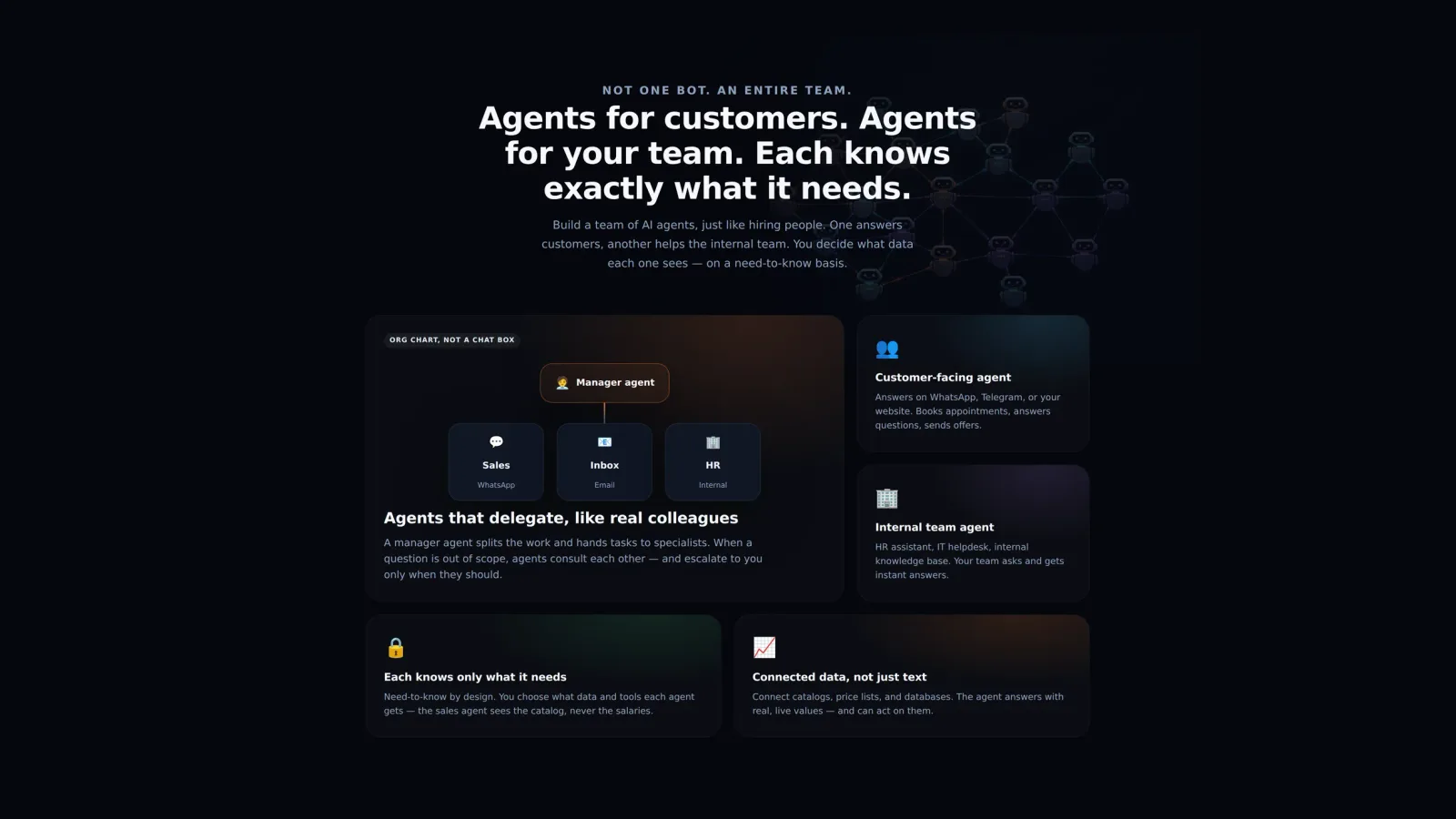
In Agentura you build an org chart, not a chat box. A manager agent receives a request, decides who should handle it, and hands the task to the right specialist. When a sales question reaches an agent that’s out of its depth, that agent doesn’t guess — it passes the work to the specialist who owns it, and escalates to a human only when it genuinely should.
This is real delegation, not a scripted hand-off. The manager can split a multi-part task across several specialists, wait for their results, and assemble the answer. Need temporary capacity for a one-off project? A manager can even spin up a short-lived contractor agent and retire it when the work is done.
Each agent knows only what it needs
Delegation is only safe if access is scoped. Agentura is need-to-know by design: you decide what data and which tools each agent receives. The sales agent sees the product catalog and can place orders; it never sees payroll. The HR agent answers internal policy questions; it never touches customer payments. Connectors are scoped per project, so an agent literally cannot reach a system it wasn’t given.
The sales agent sees the catalog — never the salaries. That’s not a setting you remember to turn on; it’s how the platform is built.
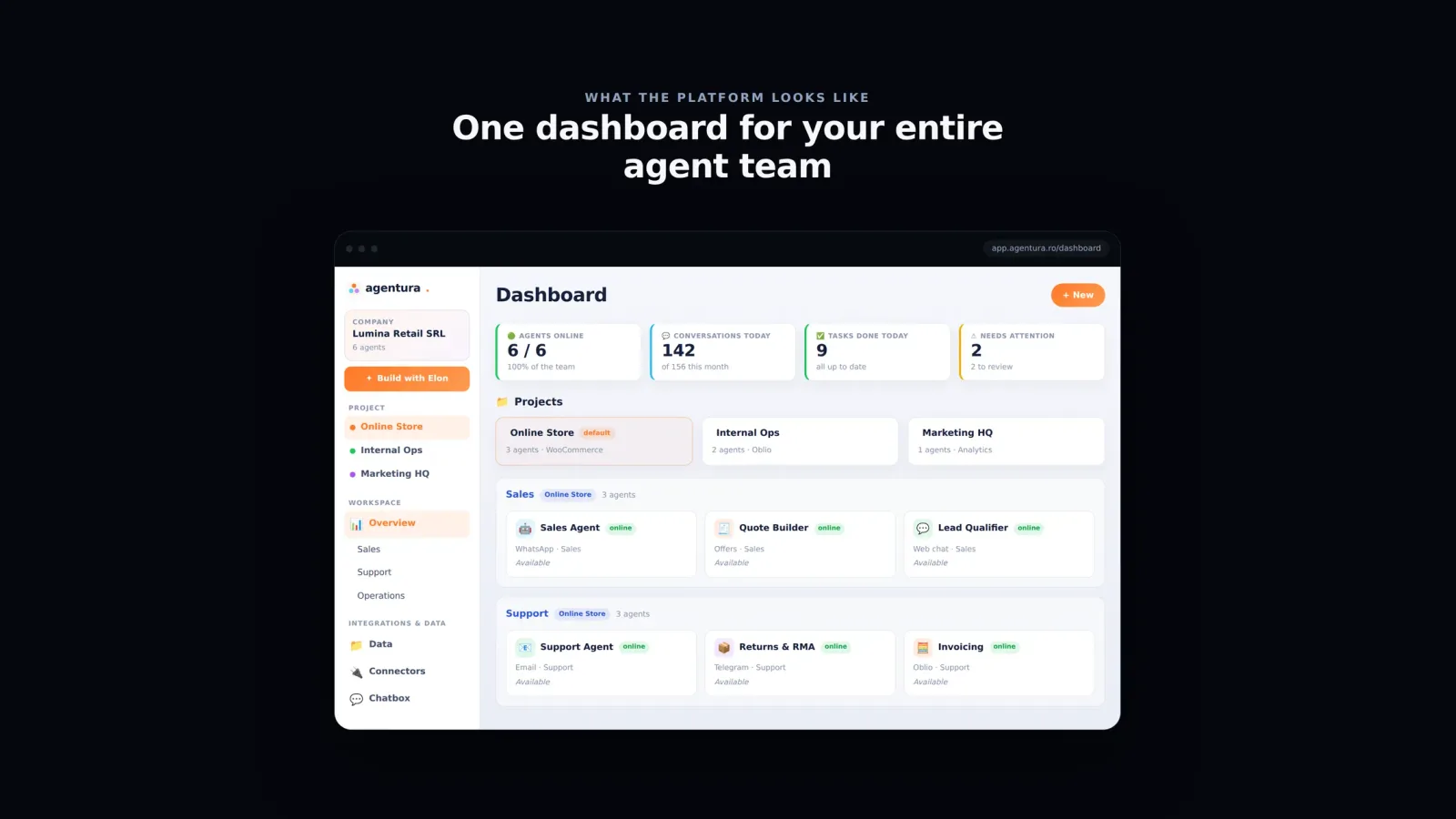
One dashboard for the whole team
Your company, its projects, and every agent’s role and status — in one view.
Because every agent lives in the same workspace, you get a single dashboard for the entire team: who’s online, the conversations they’re handling, what tasks are done, and what needs your attention. You’re not managing ten disconnected bots — you’re running one team.
Why this is different
Plenty of products let you “make a bot.” Very few let you model an organization — with managers, specialists, delegation between them, and per-agent access control enforced by the platform rather than by good intentions. That’s the difference between a clever demo and something you can actually put in front of customers and staff.
Start with one agent. Add a second when the first one’s plate is full. Before long you’ve built a team that runs itself — and you’re the one delegating.
Some tasks don’t live behind a tidy API. They live on a website — a supplier portal, a tracking page, a form that has to be filled in by hand. So we gave Agentura agents a real browser, and put a live mirror in front of it so you can watch them work.
“The agent can browse the web” usually means it fetched a page and summarized the text. That’s not browsing — that’s reading. Real browsing means clicking, typing, navigating multi-step flows, and dealing with pages that only make sense once they’ve rendered. Agentura agents drive an actual browser to do exactly that.
Watch it happen, in real time
The part people remember is the live mirror. When an agent opens the browser, a panel streams what it’s doing as it does it — pages loading, fields being filled, buttons being clicked. It isn’t a screenshot after the fact; it’s a real-time view of the session. You can see the agent’s reasoning turn into action, step by step.
A real browser the agent drives — and a live mirror so you’re never guessing what it did.
Three tiers, one capability
Under the hood there are three complementary modes, so the right one fits the task:
Sandbox browsing — the default. A safe, public-web browser the agent uses for research and routine navigation, mirrored live to your screen.
Your own device — for sites that need your login. Pair and approve a device, and the agent drives a browser on your machine, inside sessions you’re already signed in to — so logins stay where they belong, on your device.
Co-browsing — the agent can build and serve an interactive page you step through together, turning a lookup into a shared workflow.
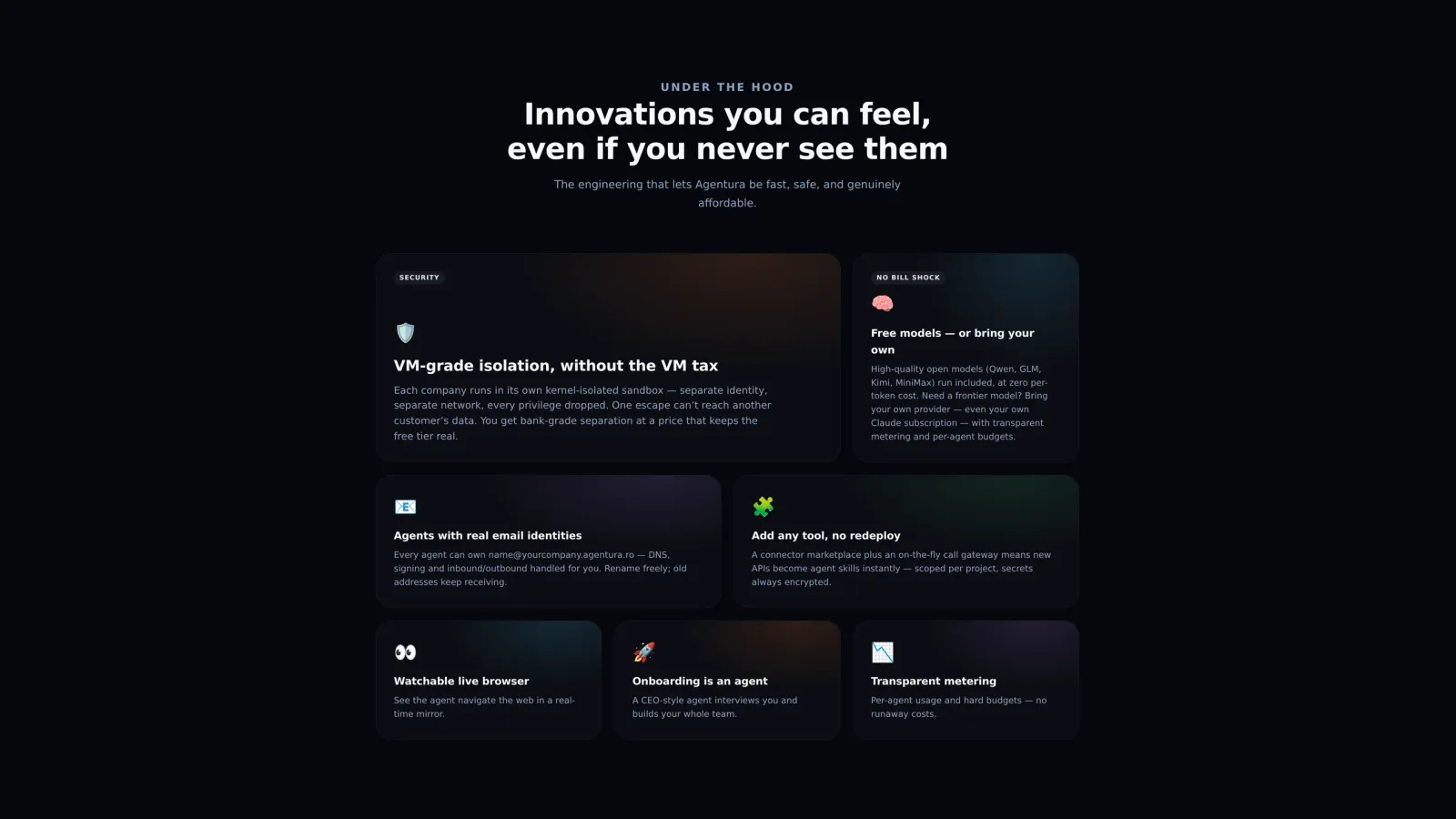
The live browser is one of several capabilities designed to be felt, not just listed.
Why a live view changes the trust equation
Autonomy is only useful if you trust it, and trust comes from transparency. A black-box agent that “handled it” leaves you wondering what it actually did. A watchable browser removes the doubt: you can glance at the mirror, confirm it’s on the right page doing the right thing, and step in if needed. It’s the difference between hoping and knowing.
The web wasn’t built for machines, but most of your day still happens there. Now an agent can navigate it the way you would — and let you watch over its shoulder.
An agent that can only talk is a fancy FAQ. The interesting part starts when it can act — place the order, issue the invoice, mark it paid, read the file, generate the image, run the code. That’s what connectors are for.
Conversation is the easy half. The half that actually moves your business forward is the part where something happens in a real system afterwards. Agentura agents are built to do the work, not just describe it.
Real systems, real actions
Connect your accounts and an agent can place WooCommerce orders and mark them paid, issue invoices through Oblio and SmartBill, raise and track PayPal invoices, read your Google Drive, send email from a real address, generate images, and run code. These aren’t canned integrations bolted onto a chat window — they’re tools the agent decides to use, in the middle of solving a problem, the same way a capable employee would.
Because connectors are multi-instance and project-scoped, the same agent platform can serve a shop, an internal ops team, and a marketing project — each wired to its own accounts, none of them able to reach the others’.
The model never sees your secrets
Here’s the detail that matters most and gets talked about least: credentials stay encrypted, and the language model never sees them.
API keys and passwords are stored encrypted and injected at the network edge, on the way to the real service. The agent calls a tool by name; it never holds the key.
When an agent uses a connector, the request is routed through a proxy that attaches the right encrypted credential just before it reaches the external service. The key is never placed in the prompt, never returned in a response, and never exposed to the model. So even a cleverly manipulated agent has nothing to leak — there’s no secret in its context to begin with.
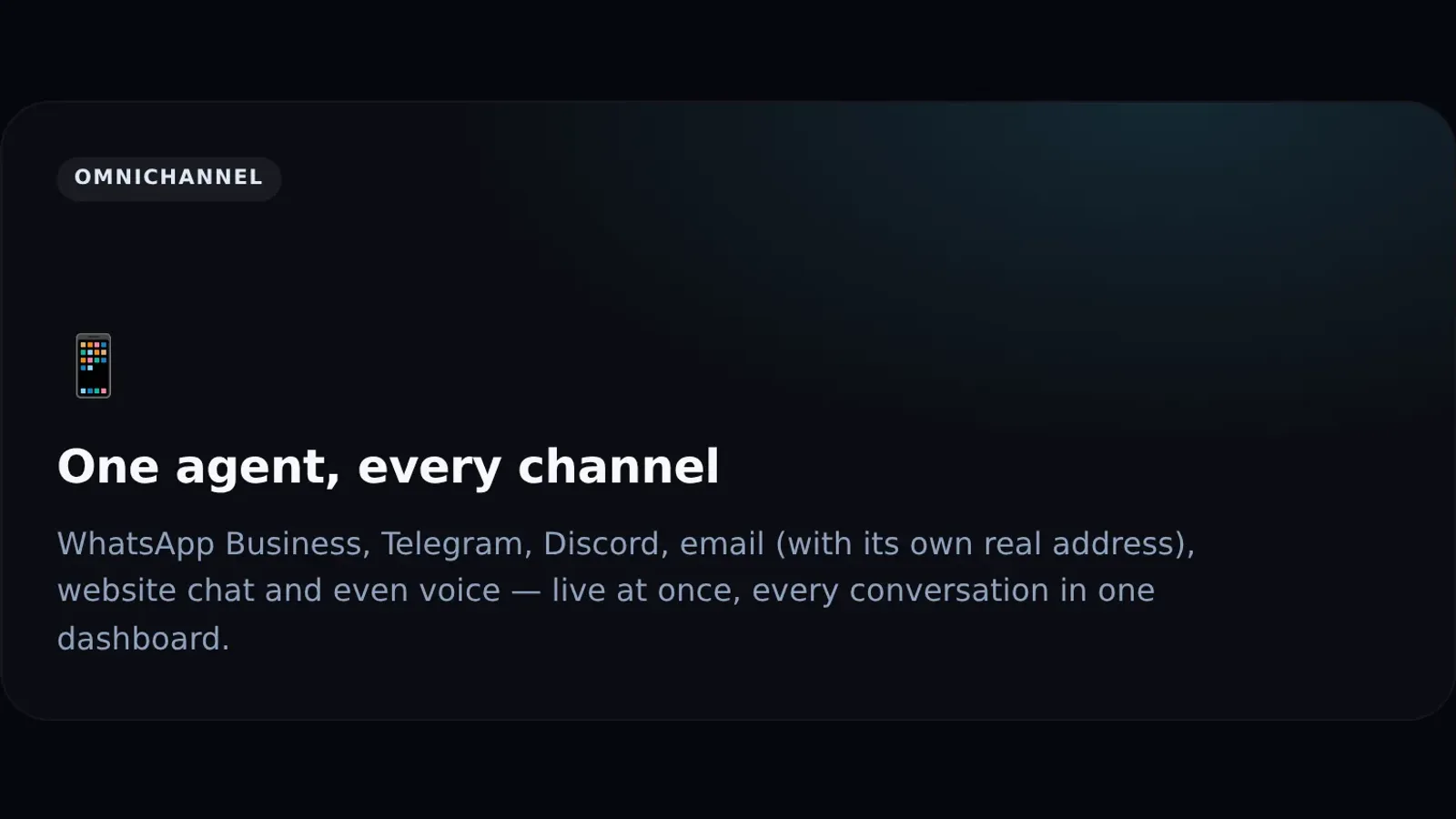
The same agent acts across every channel — and reaches the tools behind them.
Add any tool — no redeploy
Most platforms make “add an integration” a development project. Agentura treats connectors as a marketplace plus an on-the-fly gateway: the connectors above are free to switch on — you add one from the marketplace, drop in its credentials once, and its tools become agent skills almost immediately, scoped to the project that needs them, with secrets always encrypted. Running code is enabled from the start. You’re not waiting on a release to give an agent a new capability.
The result is an agent that closes the loop. A customer asks for an invoice and gets a real one. A lead wants to order and the order is placed and marked paid. A teammate needs a document and it’s pulled from Drive. Less “here’s how you could do that,” more “done.”
A useful colleague remembers your last conversation, knows where the documents are, and gets things moving without being asked twice. Agentura agents are built the same way: persistent memory, real knowledge retrieval, and a proactive heartbeat that lets them act between messages — not just react to them.
Two things separate a tool you have to babysit from a teammate you can rely on: it remembers, and it takes initiative. Most chatbots do neither. They forget you the moment the tab closes, and they never do anything unless poked. Agentura was designed to fix both.
Memory that carries across conversations
Agentura agents keep persistent memory. They remember customers, decisions, and context across conversations — so a returning customer isn’t starting from scratch, and an internal agent recalls what was agreed last week. Over time an agent builds up its own working knowledge: notes to itself, runbooks for recurring tasks, the small facts that make answers feel informed rather than generic — kept always to hand in its memory so they’re there on every turn.
Knowledge it can actually retrieve
Upload files, URLs, and documents, and they become part of what your agent can draw on — turned into a readable knowledge file and indexed for search within seconds of the upload. When the answer lives in your material, the agent looks it up and pulls the relevant passage instead of guessing, and it can search back through its own past conversations the same way. Retrieval is on demand and semantic, so the agent reaches for what’s relevant to the task at hand rather than drowning in everything at once.
It remembers customers and decisions across conversations — and when the answer is in your documents, it looks it up rather than inventing one.
A proactive heartbeat
The piece that surprises people most: agents don’t only wait for you. A built-in heartbeat wakes each agent on a schedule to do real proactive work — check on open orders and tasks, follow up where a follow-up is overdue, surface something that needs your attention. It’s the difference between an assistant that answers when spoken to and one that notices a problem before you do.
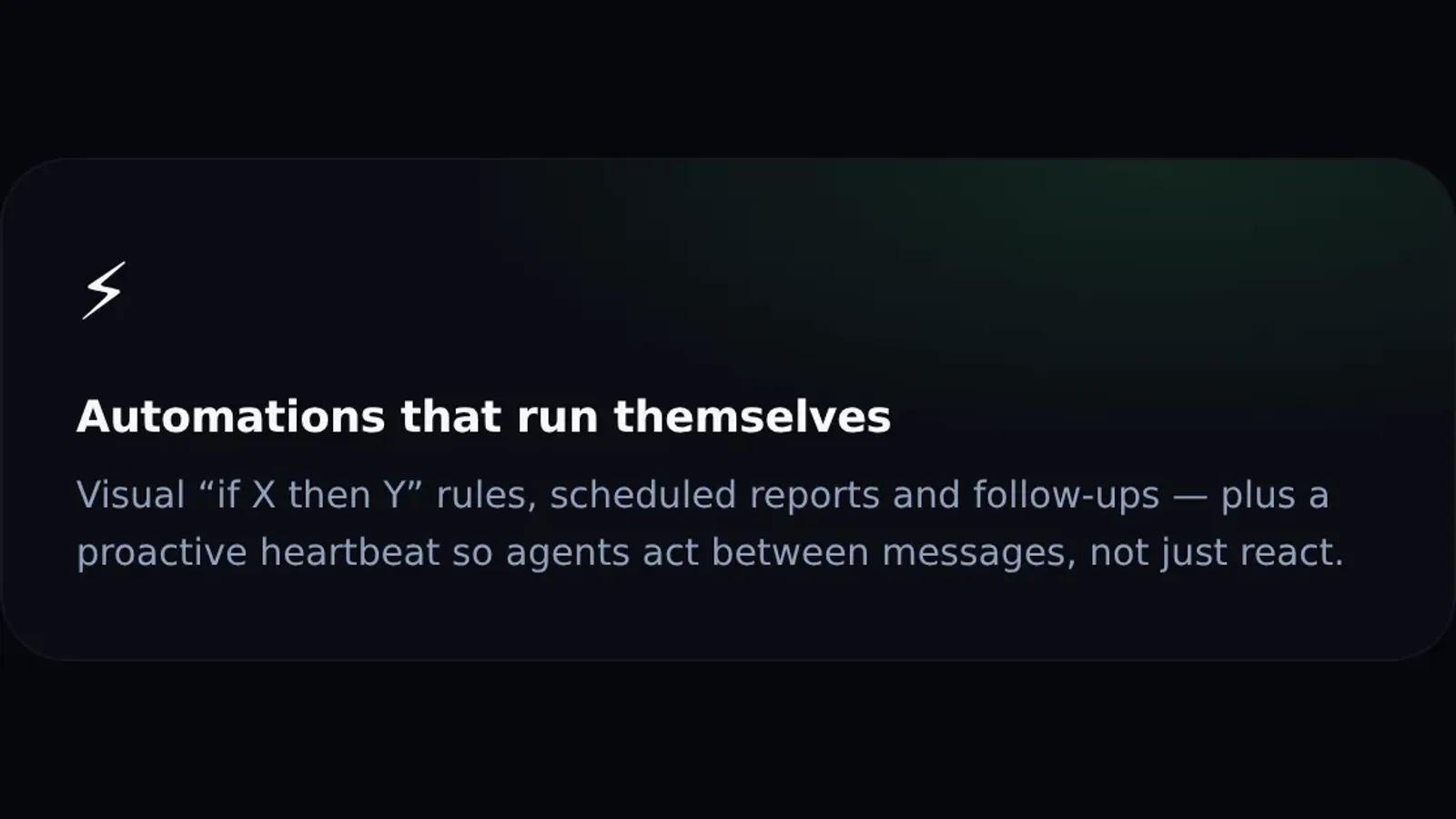
Visual “if X then Y” rules, scheduled reports, and a heartbeat that keeps agents working between messages.
Automations on top
For the patterns you want to make explicit, there are automations: visual “if X then Y” rules, scheduled reports, and recurring follow-ups. Combine that with the heartbeat and your agents stop being a place you go to ask questions and start being something that quietly keeps your operation moving — sending the report, chasing the open ticket, flagging the exception.
Memory makes an agent feel like it knows you. Knowledge makes it accurate. The heartbeat makes it proactive. Together, they turn a chat window into a coworker.
Your customers already live in WhatsApp. The question is whether anyone is there to answer them at 9 p.m. on a Sunday — or whether your agent is.
Always on, on the channel they already use
Agentura links an AI agent to your WhatsApp number so it can answer customers around the clock. You connect the number by scanning a QR code — exactly like adding WhatsApp Web from Settings → Linked devices — and from then on the agent fields incoming messages on that line. It handles product questions, books appointments, and explains your offers, without making anyone wait for office hours. The agent replies in plain conversation, the way your customers expect to chat.
Because it never sleeps, the slow leak of missed messages stops. Every inquiry gets a fast, on-brand answer, whether it arrives at noon or midnight.
It doesn’t just talk — it acts
A chatbot that only replies is a glorified FAQ. The real value shows up when the agent can do the thing the customer asked for. Through connectors, your WhatsApp agent can place an order or issue an invoice right inside the conversation — the customer asks, and the work actually happens.
The customer asks a question and walks away with the order placed, not just a promise that someone will get back to them.
One dashboard for every conversation
Every WhatsApp thread lands in a single dashboard alongside your other channels. You can read what each customer asked and how the agent answered, all in one place — no tab-hopping, no separate phone to babysit. When you want a fuller picture of a customer, the whole conversation is right there beside your webchat, email, and Telegram threads.
24/7 answers to product and service questions
Appointment booking handled in the chat
Real actions like placing orders and issuing invoices via connectors
Offers and follow-ups made in the flow of the conversation
No-code setup, need-to-know data
Getting started doesn’t require a developer: you scan the QR code from the portal, and the agent starts answering — that’s the whole setup. WhatsApp comes with the Business plan (from €49/month), so it’s a deliberate step up from the free webchat tier rather than something to wire together by hand. And the agent stays disciplined about data — it only sees the information you choose to give it, on a strict need-to-know basis, so sensitive details aren’t floating where they don’t belong.
The result is a presence on WhatsApp that feels responsive and human, backed by an agent that can finish the job rather than just describe it.
Telegram is fast, open, and where a lot of your customers and team already are. Give them an agent that’s just as quick to respond.
The same brain, a new channel
Agentura runs agents on Telegram using the exact same agent brain that powers every other channel. It answers questions, books appointments, and takes real actions through connectors — there’s no second-rate, channel-specific version. What your agent knows and can do on the web or on WhatsApp, it knows and can do on Telegram too.
That consistency matters: customers get the same answers and the same quality no matter where they reach you.
Support, internal bots, and communities
Telegram isn’t only a support line. The same agent works as an internal bot for your team and as a helpful presence in your communities and group chats. One setup, several jobs.
Customer support that answers and acts, not just deflects
Internal bots that help your team get things done
Community channels where members get instant, accurate replies
An agent that can only chat is a fancy FAQ. The interesting part starts when it can place the order or issue the invoice the conversation was actually about.
Connect it without code
You don’t write any code to put your agent on Telegram. You connect the channel, and the agent starts working. When you’re ready to give it more capability, connectors let it move from talking to doing — placing orders, issuing invoices, and more, depending on what you’ve enabled.
Everything in one dashboard
Telegram conversations don’t live in a silo. They flow into the same unified dashboard as the rest of your channels, so you always have full visibility — you can follow what’s happening and review exactly what the agent said and did, conversation by conversation. One view, every channel, full context.
For a channel that prizes speed, that’s a fitting match: an agent that’s instant to respond and consistent across everywhere your business shows up.