agentura.

Category: Capabilities

  • Sensors: teach your AI agent to watch, notify, and act

    Sensors: teach your AI agent to watch, notify, and act

    Most AI agents wait to be asked. Sensors flip that — a tiny script that watches one condition on a loop, inside your agent’s own container, and pings your agent the moment something actually changes.

    A lot of useful work in a business is that shape: watch this, and tell me when it changes. New orders. A price. A server. A car cooling down. One of our users recently told their agent to watch their Tesla’s cabin temperature and ping them when it cooled — then, over a single chat, turned it into a full thermostat that switches the AC on and off by itself. We’ll get there. First, let’s build one.

    What a sensor actually is

    Three parts. A script you (or your agent) write at workspace/sensors/<name>.py that checks one thing and prints a single line of JSON. A loop the platform runs for you — every interval_seconds (minimum 10) — executing that script in the agent’s sandbox, with no model call per tick, so it’s effectively free to run. And a delivery that fires only when the condition trips.

    The whole contract your script prints is just {"condition_met": true, "message": "…", "data": {…}}. That’s it.

    You don’t need to read any of the code below to use sensors. The steps that follow show what’s happening under the hood — handy if you’re technical or want to hand-tune one. The everyday way to make a sensor is simply to ask: tell your agent something like “watch X and tell me when Y” and it writes the script, picks the trigger, and wires up the delivery for you. The Tesla thermostat further down was built exactly that way — entirely by chat, with no human touching code.

    Step 1 — Open the Sensors tab

    Open any agent and go to the 🛰️ Sensors tab. You’ll see the contract, a + Add sensor button, and any existing sensors with their last status.
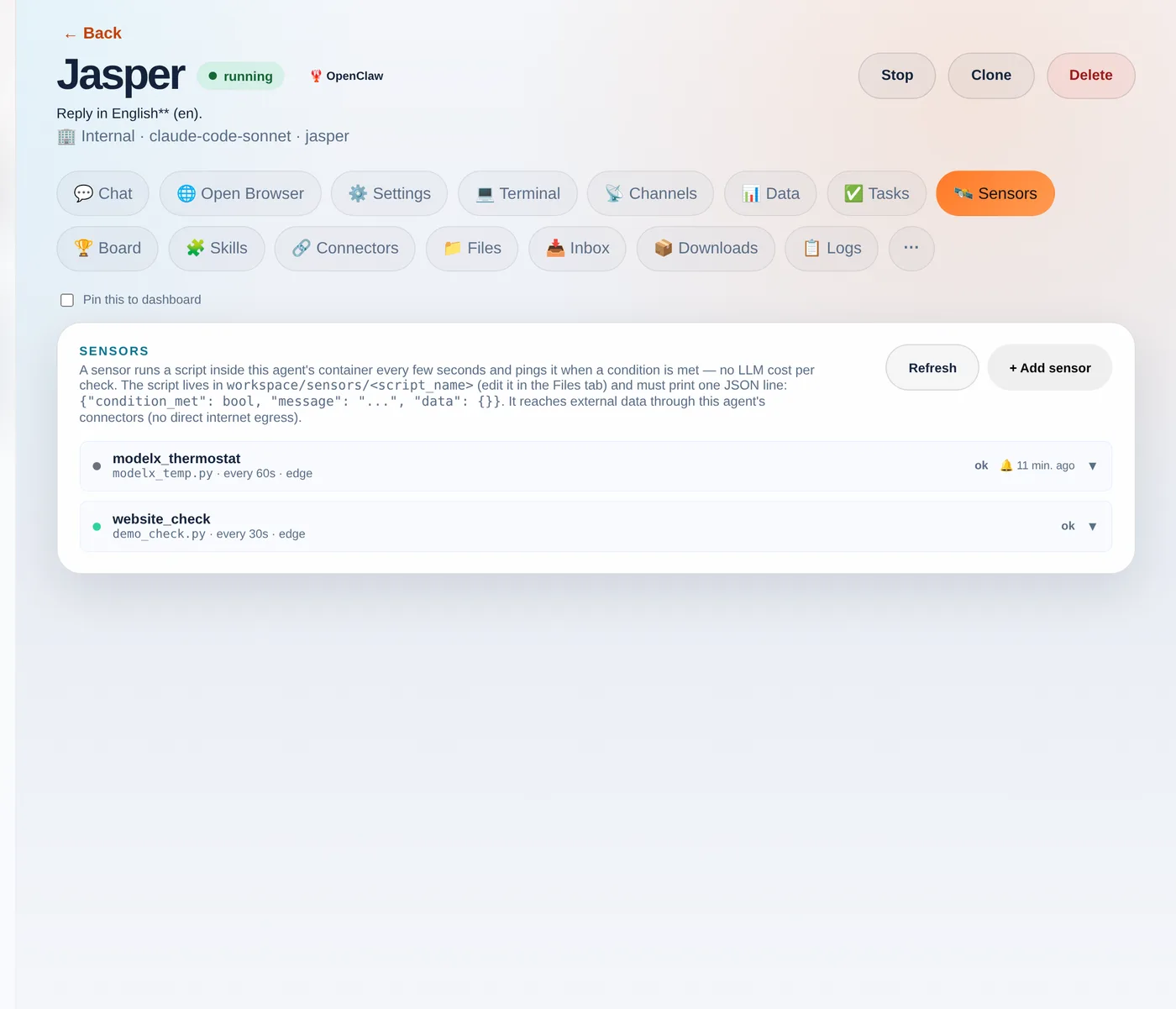
    The Sensors tab. Each sensor shows its script, interval, trigger mode and last status.
    The Sensors tab. Each sensor shows its script, interval, trigger mode and last status.

    Step 2 — Write the script

    In the Files tab, create a file under sensors/ — say demo_check.py — that prints the JSON contract. Here’s a self-contained example you can paste as-is:

    import json, os
    
    # Sensors hand the previous run's "data" back as $SENSOR_PREV_DATA, so a sensor
    # can compare against last time. This demo just counts runs.
    prev  = json.loads(os.environ.get("SENSOR_PREV_DATA", "{}"))
    count = prev.get("count", 0) + 1
    
    print(json.dumps({
        "condition_met": count >= 1,            # <-- your real check goes here
        "message": f"Demo check #{count}: all good",
        "data": {"count": count},
    }))

    The platform hands your script a couple of things for free as environment variables: $SENSOR_PREV_DATA (the previous run’s data, so you can diff against last time) and credentials to call your agent’s connectors.

    Step 3 — Add the sensor

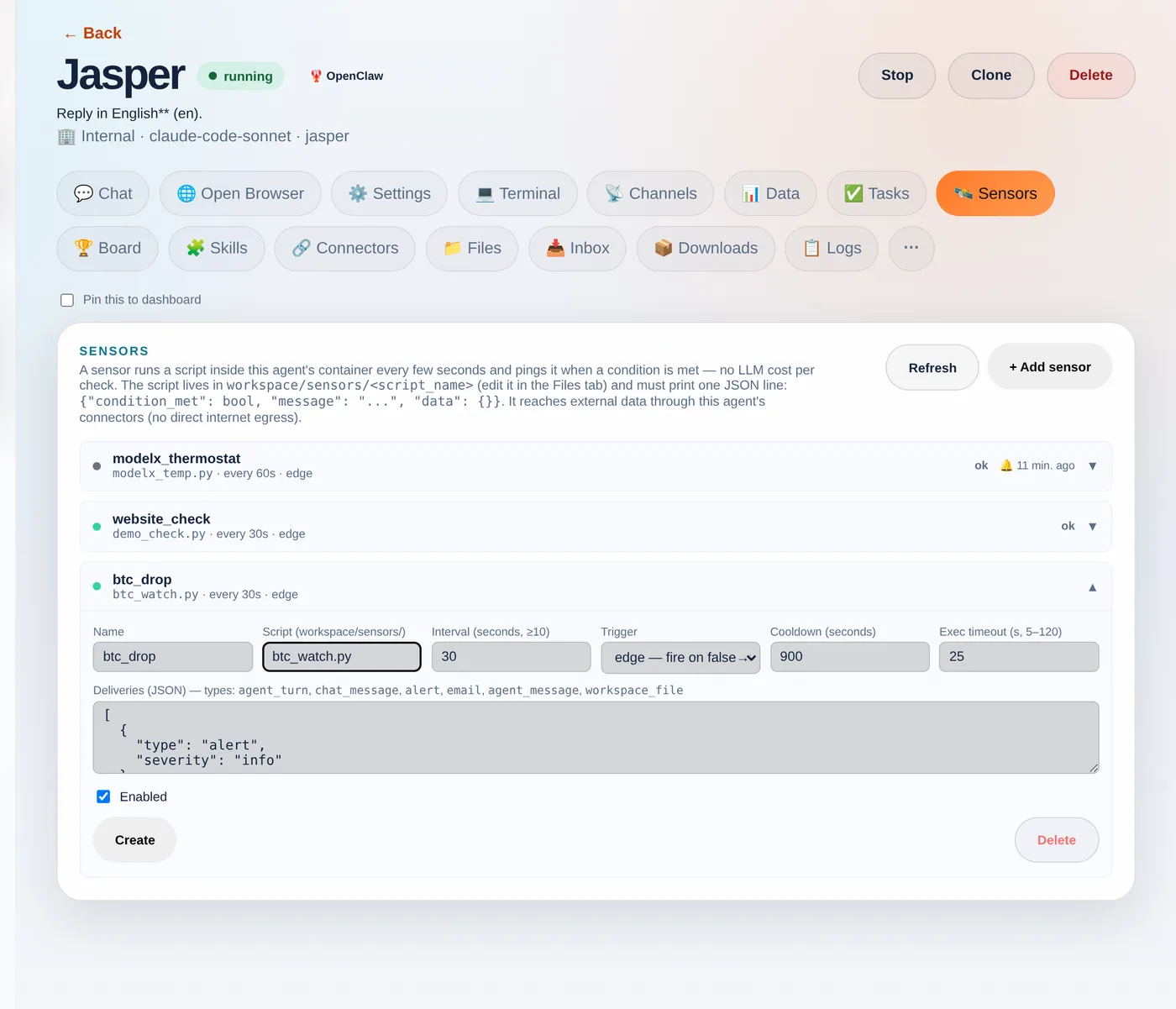
    Back on the Sensors tab, click + Add sensor and fill in the form: a name, the script filename, how often to run, and the trigger.
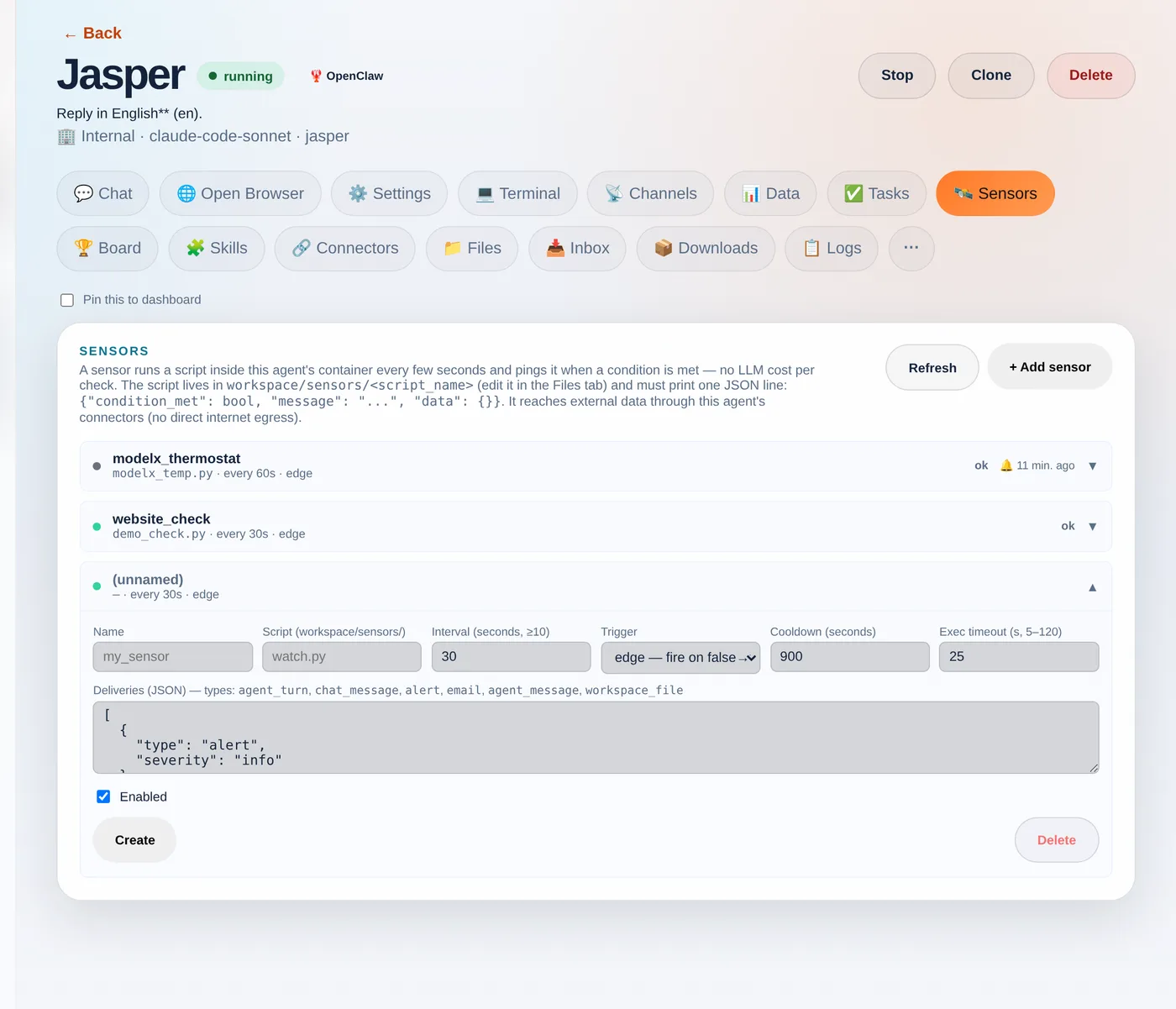
    The new-sensor form: point it at your script and choose how it fires.
    The new-sensor form: point it at your script and choose how it fires.
    • Trigger — edge fires once when the condition flips false→true (best for “tell me when X happens”); level fires on every true tick; change fires whenever the data changes.
    • Cooldown — the minimum gap between pings, so a condition that stays true doesn’t spam you.
    • Deliveries — an alert, an email, a chat_message straight into the chat, a written workspace_file, or an agent_turn that wakes the agent to act.
    Name it and point it at your script — here a "btc_drop" sensor using btc_watch.py.
    Name it and point it at your script — here a "btc_drop" sensor using btc_watch.py.

    Step 4 — Test before you trust

    Hit Test (dry-run). It runs your script once, now, and shows exactly what it returned — condition_met, whether it would fire, the message and the data — without changing anything or sending a delivery. The fastest way to iterate until it’s right.
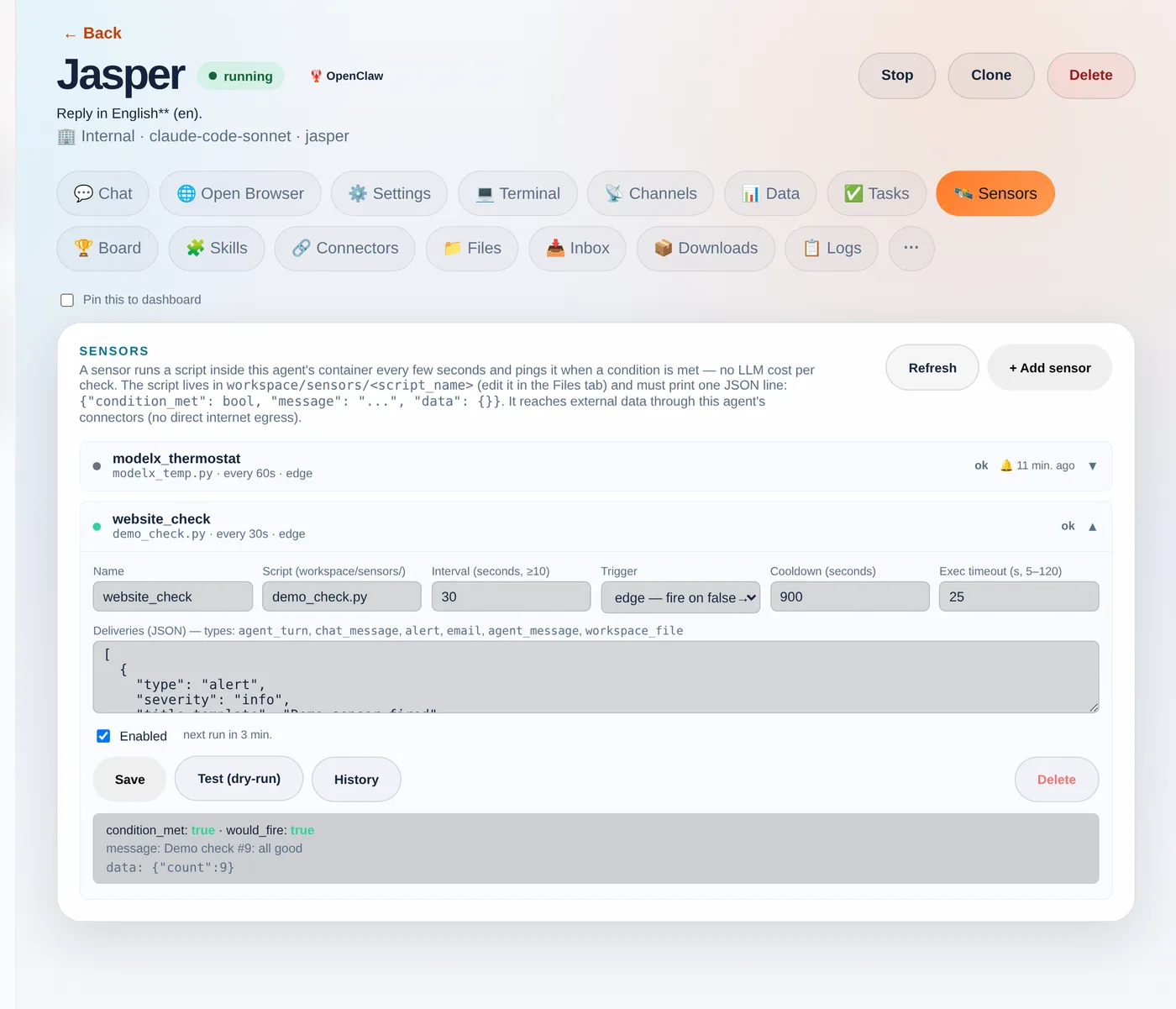
    The dry-run shows condition_met, would_fire and the message + data — with no side effects.
    The dry-run shows condition_met, would_fire and the message + data — with no side effects.

    Step 5 — Watch it run

    Once saved, the sensor runs on its loop. Click History to see every recent run: its status, whether it fired, how long the script took, and the message it printed. This is where “cheap to watch, only act on an edge” becomes visible.
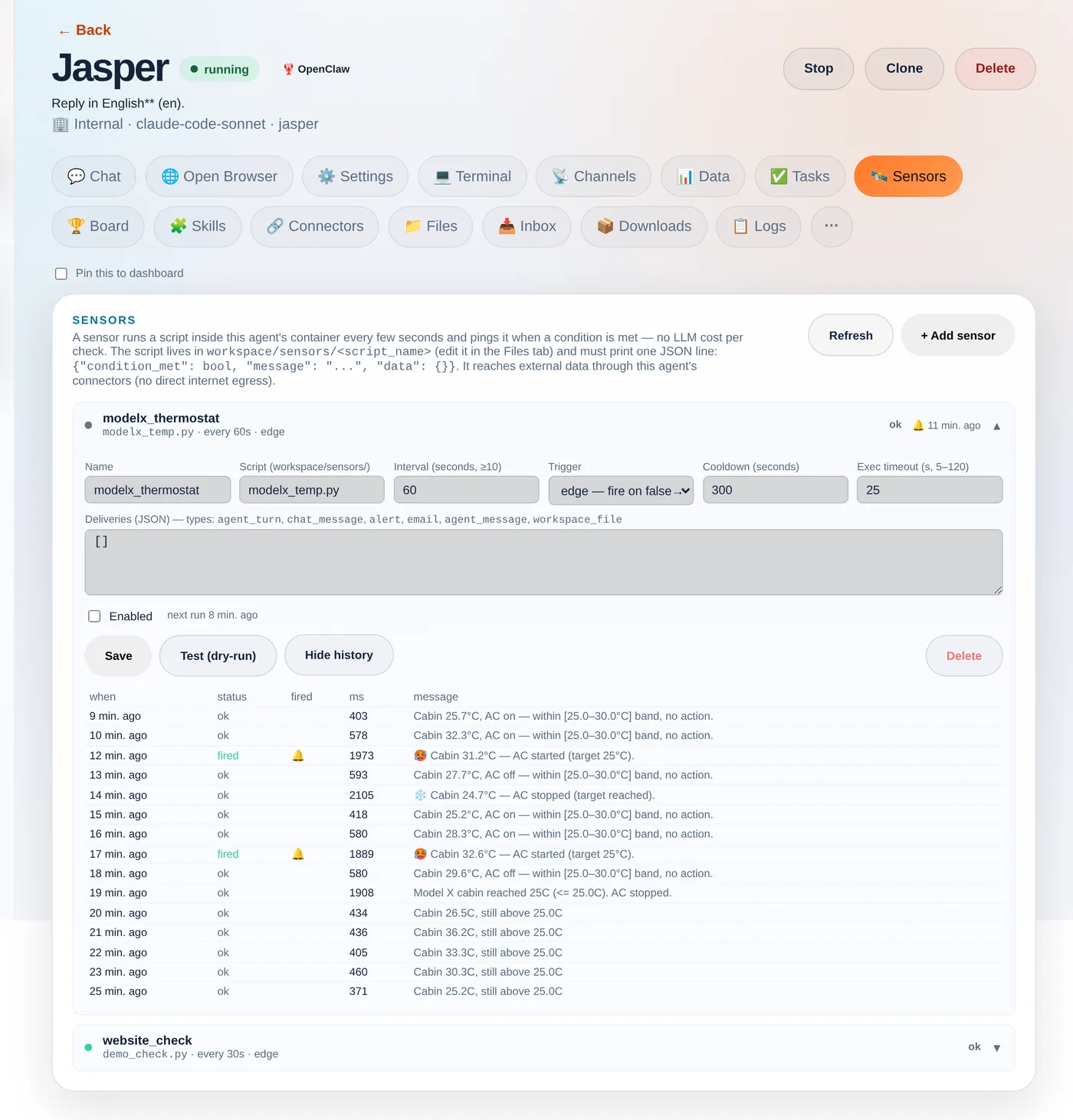
    Real run history from a sensor that watches a Tesla — and acts: it holds the cabin in a 25–30°C band.
    Real run history from a sensor that watches a Tesla — and acts: it holds the cabin in a 25–30°C band.

    The Tesla that built its own thermostat

    Which brings us back to the car. The user asked their agent to set the Model X to 25° and tell them when it reached it. The agent wrote a sensor that polls the car through the tessie connector every 60 seconds. The cabin was baking at 51°C; eleven minutes later, on its own:

    🛰️ Model X cabin reached 24.1°C (target 25.0°C)

    Then they kept going — fire when it goes above 30°, turn the AC off when it hits 25°, and finally “bounce between 30 and 25 indefinitely.” The agent rewrote the sensor each time until it was a genuine thermostat: cabin ≥ 30°C → start the AC; ≤ 25°C → stop it; in between → nothing. The history above is that exact sensor. And notice: the control loop runs as plain code — the model was only involved while authoring it by chat. That’s the whole idea: natural language to write the automation, cheap deterministic code to run it. Your script reaches real data through your agent’s connectors — any REST API, your store, your CRM, or a car:

    import json, os, urllib.request
    
    def connector_get(slug, path):
        req = urllib.request.Request(
            f"{os.environ['INTERNAL_BASE_URL']}/api/internal/connectors/{slug}{path}",
            headers={
                "X-Internal-Secret": os.environ["ORCHESTRATOR_SECRET"],  # injected per agent
                "X-Company-Id":      os.environ["COMPANY_ID"],
                "X-Agent-Slug":      os.environ["AGENT_SLUG"],
            })
        return json.load(urllib.request.urlopen(req, timeout=15))
    
    # Read a Tesla's cabin temperature through the Tessie connector
    state  = connector_get("tessie", "/<VIN>/state?use_cache=false")
    inside = state["climate_state"]["inside_temp"]
    
    print(json.dumps({
        "condition_met": inside <= 25.0,
        "message": f"Cabin {inside}°C (target 25°C)",
        "data": {"inside_temp": inside},
    }))

    How Agentura sensors are different

    Most automation and “AI agent” platforms hand you a fixed menu: a time trigger, a webhook trigger, and a no-code condition builder where you pick a field and an operator. That’s neat — until the thing you want to watch doesn’t fit the menu. The nearest relatives in spirit are Apache Airflow’s sensors (poll until a condition is met) and the newer idea of “ambient agents” (agents woken by events instead of prompts) — but those are still scaffolding a developer wires up by hand.

    Here, your agent writes the sensor itself, as real, bespoke code — generated on the spot for exactly what you asked. There’s no fixed list of supported conditions to choose from: describe it in plain language and the agent can chain several API calls, compute a rolling average, join two data sources, diff against the last run, decide, and act. Because it’s genuine code running against your connectors, the ceiling is whatever code and your integrations can do — in practice, the sky’s the limit, not whatever some settings form happened to anticipate. And it stays cheap: the loop is plain code with no model call per tick, so you can watch something every few seconds without spending tokens — the AI only steps in to build or change a sensor, or when a trip is set to wake it to act.

    A few rules of thumb

    • Default to edge + a cooldown — the difference between “tell me when it hits 25°” and a ping every 60 seconds while it sits there.
    • Checks are free; actions aren’t. Polling and conditions are plain code. Only agent_turn spends a model call — gate it behind the trigger.
    • Minimum interval is 10 seconds, and Test (dry-run) until the JSON is right before you let it loose.

    Sensors give your agents something most assistants lack: a sense of their surroundings, and the initiative to act on it. Point one at whatever you keep checking by hand and let it watch, so you don’t have to.


    Build your team →

  • Give your agent a personality

    Give your agent a personality

    A generic chatbot sounds like a generic chatbot. The agents your customers actually trust sound like someone — and that someone is yours to define.

    Every agent has a soul

    On Agentura, each agent carries its own personality profile in a SOUL.md file: its role, its tone, and exactly how it talks to your customers. A friendly front-desk greeter and a precise, no-nonsense technical specialist are the same engine wearing two very different faces — and you decide which one shows up.

    This is the difference between a tool that answers questions and a teammate that represents your brand. The personality isn’t decoration; it shapes how every reply lands.

    Shape it in plain language

    You don’t write code to do this. During setup you describe the agent the way you’d brief a new hire: who it is, what it handles, how warm or formal it should be, what it should never say. That description becomes the agent’s character, and you can refine it whenever the role evolves.

    Tell it who to be in plain words, and it stays in character — sale or complaint, first message or hundredth.

    Security is never optional

    Personality is flexible. Safety is not. No matter how you shape an agent’s tone, its security guidance is always-on — the baseline rules that keep it from being talked into doing something it shouldn’t stay in place underneath every profile you write. You get full creative control over voice without trading away the guardrails.

    Consistent on every channel

    An agent that’s warm on your website but robotic over email isn’t really one agent. With Agentura, the personality you define travels with the agent across every channel it works on. Customers meet the same character wherever they reach you, which is exactly what makes it feel like a real member of the team rather than a script that changes with the wiring behind it.

    • One profile, defined once — in language anyone on your team can write.
    • One consistent voice — the same across every conversation and channel.
    • One non-negotiable — security stays on, always.

    Give your agent a personality →

  • Upload your docs: an instant knowledge base

    Upload your docs: an instant knowledge base

    An agent that guesses is a liability. An agent that looks it up is an employee. The difference is a knowledge base.

    Upload it, and it’s ready

    Drop in your files, paste your URLs, add your documents — and they become instantly available to your agent. Product manuals, policies, price lists, internal guides: whatever your team would normally have to memorize or dig for, your agent can pull from on demand the moment you’ve added it.

    There’s no lengthy training step and no rigid template. If it’s in your knowledge base, your agent can use it to answer.

    It reads the source, it doesn’t improvise

    Under the hood, Agentura keeps your uploaded documents out of the agent’s always-on context — so they never bloat the conversation or get half-remembered. Instead, every file is text-extracted and catalogued for the agent, which is told to open the relevant document and read it directly before it answers, rather than improvising. When a question maps to your material, it goes to the source, finds the answer in what’s written, and cites where it came from. The result is replies grounded in your actual documents, not plausible-sounding inventions.

    The agent doesn’t try to remember everything. It opens the right document at the right moment — and answers from what’s actually written there.

    It remembers what was said

    Your knowledge base isn’t the only thing an agent can draw on. Agents can also search their own past conversations — backed by a real vector store, so the agent can semantically find what was said before. A returning customer doesn’t have to re-explain their situation from scratch: context that came up earlier stays reachable, which makes follow-ups faster and far less frustrating.

    Reference material vs. long-term memory

    It’s worth being precise here. Your knowledge base is your reference material — the documents, facts and sources you want the agent to consult. That’s distinct from long-term memory, which is what an agent accumulates over time about how you work. You curate the first directly; both make the agent sharper.

    • Files, URLs and documents — added in, text-extracted, read on demand.
    • Instructed to look it up — open the document, don’t guess, cite the source.
    • Conversation search — past chats stay within reach, backed by a vector store.

    Build your agent’s knowledge base →

  • No-code automations: scheduled tasks that run themselves

    No-code automations: scheduled tasks that run themselves

    The best work your agents do is the work you never have to ask for. That starts with the routine things happening on their own — on time, every time.

    Recurring work, scheduled — no code

    Automations on Agentura are no-code. In the Tasks tab you set up the recurring work you’d otherwise have to remember: a daily report, a chase on overdue follow-ups, a check that flags exceptions. Pick a cadence from one-click presets — hourly, every morning, weekdays at 9, weekly — or set your own schedule. No scripting, no developer in the loop — just the task and when it should run.

    Each scheduled task can pull from your data sources and deliver where you need it — an emailed report, a follow-up message — so the routine things that always slip happen reliably instead of falling through the cracks.

    Set a task once and it keeps running on its cadence, with each run’s status visible so you can see at a glance that the work actually happened.

    Agents that act between messages

    Most chatbots are asleep until someone types. Yours don’t have to be. A proactive heartbeat — on by default — lets your agents do work in the gaps — checking orders, chasing overdue follow-ups, flagging exceptions before they become problems. The agent isn’t just waiting to react; it’s keeping an eye on things and stepping in when something needs attention.

    The customer hasn’t messaged yet, but the follow-up is already sent and the exception is already flagged. That’s the point.

    Built to run on its own

    Scheduled and direct tasks run on a hybrid, sessionless task engine — meaning they don’t depend on someone being in a live chat for the work to happen. A report fires on its schedule. A follow-up goes out when it’s due. An exception gets surfaced the moment it appears. Your agents keep working whether or not anyone’s watching.

    • Scheduled tasks — recurring reports, follow-ups and checks, set with one-click cadences.
    • No code — pick what runs and when; no scripting, no developer.
    • Proactive heartbeat — agents act between messages, not just on cue.

    From reactive to proactive

    The shift is simple but it changes everything: instead of an agent that only answers when prompted, you get one that anticipates. Less dropped follow-up, fewer missed exceptions, and a team that handles the recurring work so you can spend your attention where it actually counts.

    Automate the routine work →

  • Automated appointments & booking

    Automated appointments & booking

    “What time works for you?” is the most expensive sentence in your business. It’s also the one your agent can handle entirely on its own.

    The booking dance, gone

    Scheduling is death by a thousand replies: a customer asks for a time, you check, you offer, they counter, you re-check, you confirm. Every step is a chance to lose them. Your Agentura agent collapses that whole exchange into a single, smooth interaction — the customer asks for a slot, and the agent books it.

    No phone tag. No “let me get back to you.” The conversation that used to take a day takes one message.

    It checks availability for you

    Your agent doesn’t guess at open times — it checks real availability before it offers anything, then books the slot itself. Out of the box it works from a built-in bookings system that keeps track of what’s taken; connect your Google Calendar and it checks your live free/busy there instead, so what it offers is what’s actually open. Either way, the agent always looks before it books, and a slot that’s already taken is rejected rather than double-booked.

    And when a customer asks for a time that’s gone, the agent doesn’t just say no — it offers the nearest open slots instead, so the conversation keeps moving toward a confirmed appointment rather than stalling.

    The customer asks for a slot. The agent checks availability and books it. That’s the entire interaction.

    Wherever the customer is

    Booking shouldn’t depend on which channel someone happened to use. Your agent can check availability and confirm appointments across channels, so a customer can lock in a time wherever they’re already talking to you — no “please call us during business hours,” no redirecting them to a separate form they’ll never finish.

    Less back-and-forth, more booked

    The math is straightforward. Every round of scheduling friction is a customer who might drift away; remove the friction and more of them actually book. Your team stops playing calendar middleman, and your agent quietly turns interest into confirmed appointments — available around the clock to take requests, and offering the slots that fit your working hours.

    • Real availability — checked before booking, not guessed.
    • Automatic booking — the agent confirms the slot itself.
    • Every channel — wherever the customer is talking to you.

    Let your agent handle booking →

  • One dashboard, smart alerts

    One dashboard, smart alerts

    A team of agents working across a dozen channels is only an asset if you can see it. Scattered tabs are how good work goes unnoticed.

    Everything in one place

    Every conversation — across every channel and every agent — lands in a single dashboard. You see your agents and whether they’re online, the tasks they’ve completed, and the alerts that need your attention, all in one place. No jumping between inboxes and apps to piece together what’s actually happening; the whole operation is on one screen.

    It’s the difference between managing a team and chasing it. When everything reports to one place, you can actually run things.

    Alerts that respect your attention

    More visibility usually means more noise. Agentura’s smart alerts do the opposite — they surface what matters and stay quiet about what doesn’t. Your agents raise an alert when something genuinely needs a human — an escalation, a frustrated customer, a question they can’t answer, an error — rather than pinging you for every message. So your attention goes where it’s worth the most.

    The goal isn’t to know about every message. It’s to know about the ones that need you.

    Organized by project, never lost

    If you run more than one project, the dashboard keeps them straight. Per-project unread badges show you exactly where activity is building, while cross-project notifications make sure nothing important slips just because it happened somewhere you weren’t looking. You stay informed across the whole picture without drowning in any one corner of it.

    • One dashboard — every channel, every agent, every conversation.
    • Smart alerts — what matters surfaces, the rest stays quiet.
    • Per-project badges & cross-project notifications — informed, not overwhelmed.

    Stay in control without hovering

    The point of putting AI agents to work is to stop watching every conversation — but you still need to know the operation is healthy and that exceptions reach you. One dashboard plus smart alerts gives you exactly that: full oversight when you want it, silence when you don’t, and confidence that the things needing your attention will actually find you.

    See your whole team in one view →

  • Plug agents into your systems: the API

    Plug agents into your systems: the API

    An agent that lives only in a chat window is an island. An agent with an API is a component — one you can drop into anything you’re already building.

    Reachable from your own code

    Agentura exposes an external REST API, so your agents aren’t locked inside the platform. It’s plain HTTP and JSON, authenticated with a company-scoped API key — so any system you run, from your CRM to your ERP to a script, can call it. You can list and message your agents, read conversations, manage bookings and check usage, all programmatically from your own software. The agent becomes something you call — a capable part you wire into the tools your business already depends on.

    That turns an AI agent from a destination customers visit into a building block you assemble with.

    Webhooks, so it works both ways

    Integration isn’t only about you calling out — it’s about events flowing back in. The platform also exposes webhooks, so external activity can trigger your agents instead of you having to poll for it. Subscribe to events like a new message, a new conversation or a new booking, and inbound email can wake an agent too. Something happens out in your stack, the agent hears about it, and the right action follows.

    Call the agent when you need it; let the agent hear from your systems when something happens. Integration that runs both directions.

    Built for developers

    This is the layer for teams who want an agent as part of a larger workflow rather than the whole experience. If you’re a developer stitching together a process across several systems, the API lets the agent slot in as one well-behaved component — handling the conversational or judgment-heavy step while the rest of your pipeline does what it already does well. Mint a key and configure webhooks yourself from the portal.

    • External REST API — agents, conversations, bookings and usage, reachable programmatically with an API key.
    • Call it from your CRM, ERP or scripts — plain HTTP, so the systems you already run can reach your agents.
    • Webhooks — let outside events trigger your agents automatically.

    Your stack, with agents in it

    The most powerful place for an AI agent often isn’t a standalone app — it’s woven into the workflow you’ve already built. With a programmatic API and webhooks on both ends, Agentura lets you do exactly that: keep your systems, and give them an agent that fits right in.

    Plug agents into your stack →